Integrations
Connect organization-owned tools without exposing provider credentials to agent processes.
Integrations give selected profiles bounded access to external systems. Organization owners control which provider is connected, which tools or services are enabled, which profiles receive access, the exact write permission mode, and the business meaning stored in Context.
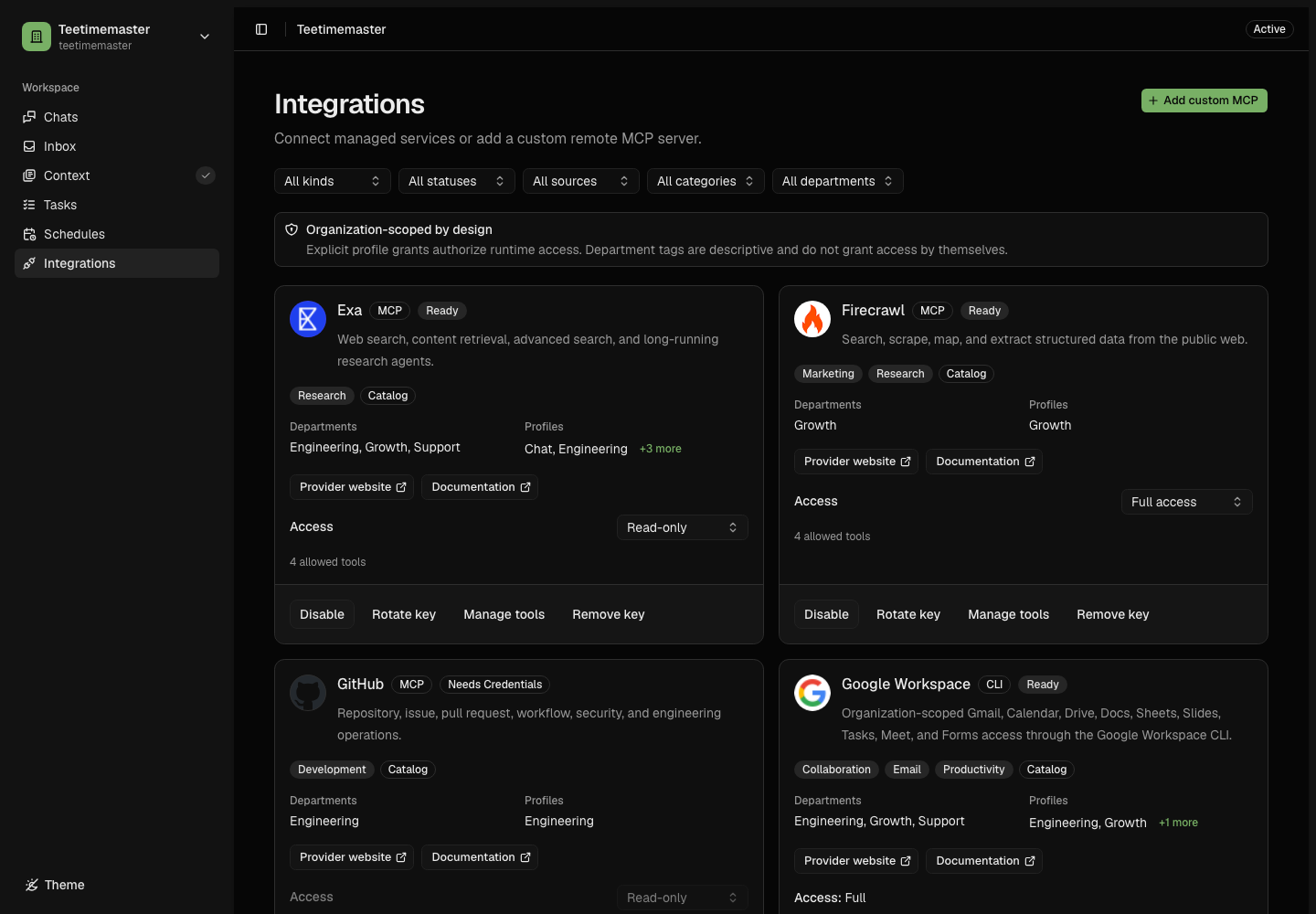
Cards summarize provider identity and readiness. Connection, access policy, tools, and business context live in one management sheet.
Registry and Management Sheet
The registry stays intentionally compact: each card shows the provider logo, name, short description, one readiness badge, and one contextual action. Select Connect, Finish setup, Manage, or Review to open that provider without losing the current filters or page.
The management sheet has four consistent sections when a connected provider exposes tools:
- Connection contains provider guidance, official links, redacted account state, credentials, consent, and managed resource scope.
- Access contains actual profile grants, descriptive department scope, and the exact Read-only, Ask before writes, or Autonomous permission mode.
- Tools appears after an MCP integration is connected and owns the explicit eligible-tool snapshot. Tool search matches tool names only and never changes authorization by itself. Search and selection controls remain visible while the inventory scrolls. Select all eligible tools always targets the complete inventory rather than search results.
- Business Context records organization purpose, department-specific meaning, business
functions, typical work, workflow keys, role, and policy as text. Submitting prepares a bounded
preferences.tomlupdate under the generated connector key for human review rather than mutating canonical Context directly.
Use the lifecycle actions at the top of Connection to enable, disable, reconnect, rotate, disconnect, or remove credentials. Stored secrets remain hidden. Unsaved forms must be discarded explicitly before closing the sheet, switching sections, or navigating away.
Integration Types
| Type | Who Defines It | Examples |
|---|---|---|
| Managed provider | Reviewed catalog plus hosted or fixed backend provider | Resend, GitHub, Lemon Squeezy, Upstash |
| Managed CLI | Reviewed catalog, pinned vendor binary, scoped gateway | Google Workspace |
| Native Git | Reviewed GitHub runtime and backend smart-HTTP gateway | Engineering repository source transport |
| Custom remote MCP | Organization configuration with strict HTTPS validation | An organization-owned Streamable HTTP server |
| Trusted local MCP | Agent image and Git profile grants | Structured questions |
Safe Connection Flow
Select
Open the card’s contextual action. Review provider guidance, resource scope, and the initial permission mode in Connection. A first connection starts on read-only unless you explicitly choose Ask before writes or Autonomous.
Connect
Provide a write-only credential or complete provider consent.
Review
Open Access to confirm the permission mode, then use Tools to review the inventory. Oblive selects every tool currently eligible for that mode. Narrow the explicit snapshot if needed.
Resolve
The backend creates a short-lived execution capability.
Act
Reads execute; consequential effects follow action policy.
Credentials
Credential inputs are write-only. The product reports readiness and redacted account information, but it never returns the stored secret. Provider credentials are decrypted only inside the backend gateway for an authorized execution.
Current State and Business Context
Connection state and business meaning are separate:
- The Integrations registry says what is connected and eligible now.
- Organization Context says why the business uses a system, which workflows depend on it, and whether it is primary, fallback, or merely allowed.
- Onboarding sources remain evidence of the business at onboarding time. They do not freeze the organization’s future toolset or prove that a connector is currently ready.
After a connection and first tool review succeed, open Business Context. Supply the organization purpose, department meaning, business functions, typical work, role, policy, and any existing workflow keys. Leaving Business Context does not roll back the connection. The section continues to show that business meaning is missing until the focused repair is approved and reconciled.
Context repair never edits canonical Context immediately. Oblive prepares a bounded update, asks only for missing meaning, and requires human approval before promotion.
The active mapping state in Business Context and Context Health findings answer different questions. Once an exact connector key is present in reviewed Context, it remains mapped even if Context Health warns that its current permission mode or enabled capabilities cannot perform the declared business role. You can still provide bounded hints for a reviewed mapping update; operational capability findings do not open one automatically.
Readiness
Readiness is a control-plane assessment; it does not call the provider.
| State | Meaning |
|---|---|
| Ready | Enabled, credentialed when required, and has at least one allowed tool. |
| Disabled | Connection material and tools exist, but runtime use is disabled. |
| Needs credentials | The required provider credential is missing. |
| Needs configuration | A managed data connector still needs a resource scope. |
| Needs tools | Credentials and resource scope are valid, but no reviewed tool is selected. |
| Unavailable | The reviewed catalog/runtime no longer permits this connector. |
Every new run receives the latest eligible inventory. An already-running task is not hot-patched; if authorization changes, its old capability fails and the work restarts from current state.
Start Narrow
First connection defaults to read-only. Oblive initially selects every current read-only tool so a valid connection is usable, then lets you narrow that explicit snapshot. Switching modes selects every tool currently eligible for the target mode; you can narrow the selection afterward. Tools a provider adds later remain unavailable until an owner explicitly selects them.
Choose Ask before writes when the workflow needs external changes but each effect should be reviewed. Choose Autonomous only when the workflow genuinely requires independent execution and the bounded provider scope is understood.